
Many site owners have encountered the dreaded “404 Not Found” error, either from a broken link, a deleted page, or a mistyped URL. When you spot these in your analytics or Google Search Console, the natural question is: Are 404s bad for SEO?
The short answer is no, not always. A few 404 errors are a normal part of maintaining any healthy website. But unmanaged 404s, especially those from important or linked pages, can harm user experience, waste link equity, and create crawl inefficiencies.
In this updated guide, you’ll learn what 404s really mean, how they affect SEO, how to find and fix them using Google Search Console, and how to decide between letting a page return a 404 or setting up a 301 redirect.
Table of Contents
A “404 Not Found” status code means the server cannot locate the requested page. It’s the web’s way of saying, “The content you’re looking for doesn’t exist here.”
When you enter a URL, the server responds with a status code:
A 404 error page can be a default server message or a custom-designed page that matches your site’s branding. Most content management systems (like WordPress or Shopify) automatically generate 404s for missing content.

Common reasons include:
404s are not an automatic ranking penalty. Google’s John Mueller has repeatedly confirmed that having some 404s is normal and expected. However, problems arise when they affect important pages or user experience.
Here’s how unmanaged 404s can cause indirect SEO issues:
When visitors land on broken pages, they often leave immediately. High bounce rates and short dwell time can signal poor satisfaction, which may hurt engagement metrics over time.
If external sites link to pages that return a 404, the link equity from those backlinks is lost. Redirecting those URLs to relevant pages helps preserve your site’s authority.
Frequent 404s can make your site appear neglected or unreliable. A well-maintained, consistent browsing experience builds trust and encourages visitors to return.
Excessive 404s can slow search engine crawlers. While Googlebot handles them gracefully, constant dead ends waste crawl resources that could be spent on new or updated content.
Bottom line: A few 404s are fine. But large volumes of broken or linked pages should be addressed quickly for both technical and user experience reasons.
Google Search Console is your most valuable tool for identifying and managing 404 errors. Here’s how to use it effectively:
Once you’ve identified the missing page, decide whether to redirect or leave it as a 404 (see next section).
After updating or redirecting URLs, return to GSC and click “Validate Fix.” Google will re-crawl and confirm the issue is resolved.
💡 Tip: Set a recurring reminder (monthly or quarterly) to review your “Not Found” URLs in GSC. Sites that update content frequently should monitor even more often.
Choosing whether to redirect or keep a 404 depends on user intent and content relevance.
Returning a real 404 tells both users and search engines that the content is gone — preventing confusion or mismatched results.
Redirects help retain ranking signals and ensure visitors land on a relevant alternative.
| Situation | Action | Reason |
|---|---|---|
| Page deleted permanently | Leave 404 | Honest signal of removal |
| Page moved or renamed | 301 Redirect | Preserve link authority |
| Duplicate topics merged | 301 Redirect | Consolidate relevance |
| Temporary campaign expired | 404 | Prevent misleading redirects |
| Broken external link to irrelevant page | 404 | Avoid mismatched experience |
A well-designed 404 page turns a dead end into a helpful experience.
Essential Elements:
Example message:
“We couldn’t find the page you’re looking for. Try searching our site or head back to the homepage.”
Avoid turning your 404 into a marketing pitch — focus on usefulness.
Many large brands pay special attention to their 404 pages, turning what could be a dull or frustrating user experience into something more helpful, or even entertaining. Below are some notable examples and what we can learn from them.
GitHub
Overview: GitHub’s 404 page features a fun graphic referencing the “Octocat,” their mascot, with a visually appealing design.
Key Takeaway: Even a major developer hub keeps things simple. They offer a clear message, a few navigation links, and brand-based artwork that reassures users they’re still on GitHub.

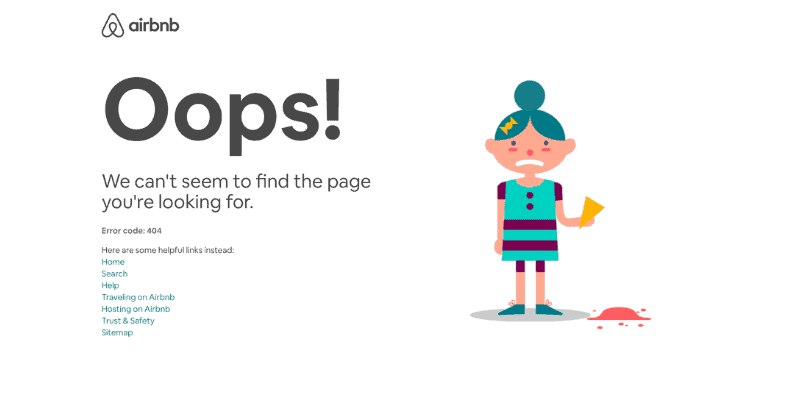
Airbnb
Overview: Airbnb’s 404 page is minimalist with a straightforward apology note and a link to the homepage or to browse popular destinations.
Key Takeaway: They put user experience first by promptly guiding visitors to the main functional areas of the site (like searching for places to stay).
Pixar
Overview: Pixar’s 404 page often showcases one of their beloved characters in a creative scene related to something being “lost.”
Key Takeaway: This approach not only fits Pixar’s brand identity but also adds a bit of playful charm, turning a potential frustration into a smile.

What We Can Learn:
A soft 404 occurs when a missing page looks like a 404 to users but returns a “200 OK” status code to search engines.
Why this matters:
Search engines may mistakenly index these pages, wasting crawl budget and creating duplicate or low-quality results.
To fix soft 404s:
404s are not the enemy of SEO – neglect is. A few missing pages are inevitable, but a pattern of ignored 404s can erode link authority, frustrate users, and signal poor site maintenance.
Use Google Search Console as your command centre: identify missing pages, trace links, and apply the right fix. Redirect valuable URLs when relevant, and allow true 404s for content that’s gone for good.
By auditing regularly, creating helpful 404 pages, and maintaining accurate redirects, you protect both your user experience and your site’s long-term SEO performance.
In short: 404s don’t hurt SEO – unmanaged 404s do.

Get practical SEO and digital marketing tips that help your business win more customers from Google - straight to your inbox, no jargon.
By subscribing you agree to receive marketing emails from Studio 36 Digital. Unsubscribe any time. See our Privacy Policy.